

Seriesly APK 1.0.3

Advertisement
Seriesly APK is a powerful TV show tracker for Android that helps you manage watchlists, track episodes, and organize your streaming experience in one simple app.
Information of Seriesly
| Name | Seriesly |
|---|---|
| Updated | |
| Compatible with | Android 5.0+ |
| Last version | 1.0.3 |
| Size | 23 MB |
| Category | Entertainment |
| Developer | Split Apart Art |
| Price | Free |
| Google Play Link | |
| MOD | No MOD |
About Seriesly
Seriesly APK: Best TV Show Tracker for Android
Keeping up with TV shows should feel fun, not messy. But once your watchlist spreads across multiple streaming services, things change fast. You start one series on Monday, continue another on Wednesday, and by the weekend you are already asking yourself the same questions again: Which episode was I on? Where is that show streaming? Do I still need all these subscriptions? That is where Seriesly APK makes a real difference.
Seriesly APK is built for Android users who want one clean place to manage their TV habits. It helps you organize shows from different platforms, track episode progress, see where each title is available, and monitor streaming costs without turning the process into extra work. Instead of relying on memory or bouncing between apps, you get a practical system that keeps your viewing routine under control.
If you watch a few series at a time, enjoy planning your next binge, or simply want a better overview of your entertainment choices, this app fits naturally into your daily routine. It is simple, focused, and designed around a real problem many viewers face today: too much content, too many platforms, and not enough clarity.
What Is Seriesly APK?
At its core, Seriesly APK is an Android TV show tracker made for people who want a more organized way to manage what they watch. It is not a streaming app, and it does not try to replace your favorite entertainment platforms. Instead, it acts as a smart companion that helps you keep track of your shows, your progress, and your viewing plans in one mobile-friendly space.
The app is developed by Split Apart Art, and its purpose is easy to understand from the first use. Rather than loading the screen with unnecessary extras, Seriesly focuses on the essentials: watchlists, episode tracking, streaming platform details, show ratings, and subscription cost awareness. That focused approach is one of its strongest selling points.
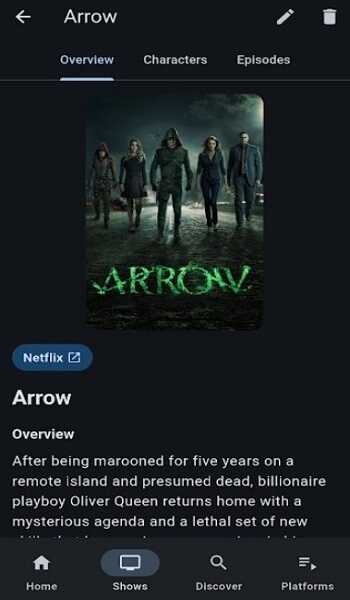
For many Android users, the biggest challenge is not finding content. It is remembering and managing it all. You might have one long-running drama on one platform, a short comedy on another, and a “watch later” list that keeps growing every week. Over time, your entertainment routine becomes fragmented. Seriesly APK helps fix that by putting the important information in one place.
This app is especially useful for:
-
People who follow multiple shows at once
-
Viewers who use more than one streaming service
-
Users who like structured watchlists
-
Anyone who wants to reduce confusion while watching TV series
Another reason the app feels relevant is its mobile-first design. You are likely to update your watch progress right after finishing an episode, while commuting, or while relaxing at home with your phone in hand. Seriesly understands that behavior. It gives you a fast and clear way to update your library without making the process feel like a chore.
In simple terms, Seriesly APK is for viewers who want order without complexity. It keeps your TV habits organized, helps you make better use of your streaming subscriptions, and turns a scattered entertainment experience into something easier to manage.
Why You Need a TV Show Tracker App
Streaming has made entertainment more flexible than ever, but it has also created a new kind of overload. You no longer watch everything in one place. One show lives on one platform, another continues somewhere else, and a third stays on your “I will start it soon” list for weeks. The more content you follow, the harder it becomes to stay organized.
That is exactly why a TV show tracker app matters. It solves problems that seem small at first, but grow bigger over time.
One common problem is episode confusion. You start a series, stop for a few days, then return and cannot remember your exact progress. Was it episode four or episode five? Did you finish the mid-season break? Did you already see that plot twist, or are you about to repeat the same episode again? These small interruptions break the flow of watching and make the experience less enjoyable.
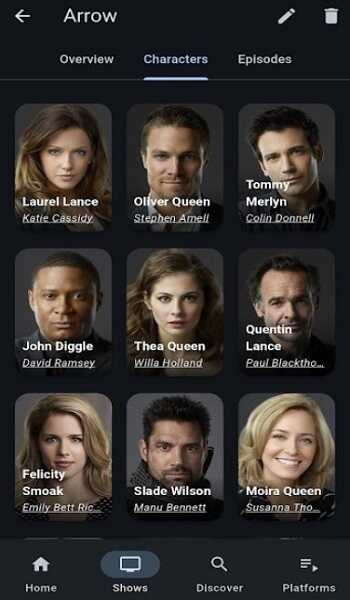
Another issue is platform confusion. Today, remembering a title is not enough. You also need to remember where it is available. Many users waste time opening multiple apps just to find one show. That process becomes tiring when you repeat it week after week.
There is also the budget side of streaming. Monthly subscriptions are easy to forget because each payment feels small on its own. But when several platforms stay active at the same time, the total can become surprisingly high. If you are not tracking what you actually use, you might continue paying for services that no longer match your habits.
A TV show tracker app helps you solve all of this by giving you:
-
A clear watchlist
-
Accurate episode progress
-
Platform availability info
-
Better visibility into your viewing habits
-
A more organized way to manage subscriptions
Think of it this way. Imagine you are following six series across three services. Without a tracker, you rely on memory and app-hopping. With a tracker like Seriesly APK, you open one app and see everything clearly: what you are watching, what is paused, what is finished, and what still deserves your attention.
That clarity matters more than people expect. It saves time, reduces frustration, and gives your entertainment routine structure. Instead of feeling like your watchlist controls you, you control your watchlist.
Key Features of Seriesly APK
What makes Seriesly APK appealing is not flashy complexity. It is the way the app takes practical tracking features and makes them easy to use on Android. Every core function is built around solving a real viewer problem, whether that problem is forgetting your last episode, losing track of unfinished shows, or spending money on subscriptions you barely use.
Below are the features that define the Seriesly experience and explain why the app stands out in a crowded category of TV trackers.
Unified Watchlist Across Platforms
A unified watchlist is one of the biggest strengths of Seriesly APK. Instead of splitting your viewing plans across different services, you can keep everything inside one organized list. This makes your entertainment routine feel less fragmented from the start.
That matters because most viewers no longer stay inside one streaming ecosystem. You might be watching a mystery series on one platform, a sitcom on another, and saving a fantasy drama for later somewhere else. Without a central list, your plans become scattered. With Seriesly, they stay together.
This feature helps you:
-
See all active and planned shows in one place
-
Avoid forgetting titles saved on different apps
-
Build a clearer, more personal viewing system
If you like order, this feature alone already adds serious value.
Episode and Progress Tracking
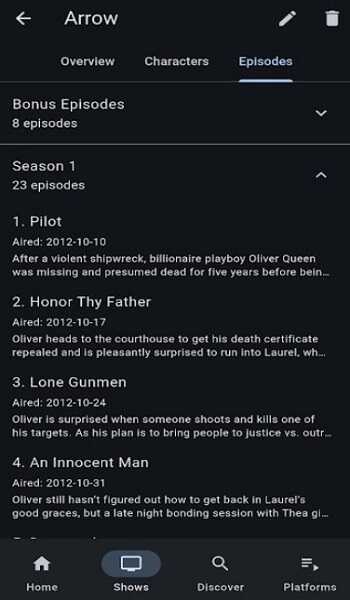
For many users, this is the most important feature in the app. Seriesly APK lets you mark your current episode and update progress as you continue watching. That sounds simple, but in everyday use it solves one of the most common streaming frustrations.
Advertisement
Advertisement
When you follow several series at once, memory becomes unreliable. A tracker removes that guesswork. Instead of thinking back and checking manually, you open the app and know exactly where you stopped.
This feature is especially helpful for:
-
Long-running shows with many seasons
-
Weekly releases that are easy to forget
-
Users who rotate between several titles
-
Busy viewers who do not watch on a fixed schedule
It also improves continuity. When you return to a show after a break, you do not lose momentum. You just continue from the right place.
Streaming Platform Availability
Knowing what to watch is only part of the decision. You also need to know where to watch it. Seriesly APK includes streaming platform information within each show entry, which saves you from opening multiple apps just to locate one title.
This is a surprisingly practical feature. It turns a common annoyance into a quick, simple step. If your watchlist is large, even small time savings matter. Over weeks and months, this feature can save a lot of repeated searching.
Here is why it helps:
-
You spend less time jumping between apps
-
Your viewing decisions become faster
-
Your watchlist feels more actionable, not just informational
Instead of saying, “I want to continue that show,” and then starting a search, you already know where it lives.
Subscription Cost Tracking
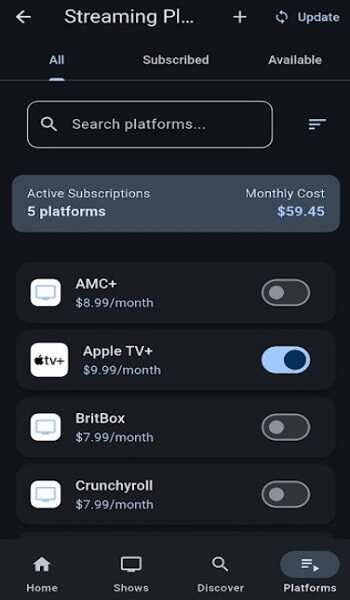
Not every TV tracker includes cost awareness, and that is one reason Seriesly feels more practical than many alternatives. The app lets you add streaming subscriptions and record their monthly prices, giving you a better overview of your entertainment spending.
This feature adds a useful budgeting layer without making the app feel financial or complicated. It simply helps you connect your watching habits with the subscriptions you pay for.
That creates useful questions:
-
Which platforms do you actually use the most?
-
Are you paying for a service with no active shows in your rotation?
-
Could you pause one subscription and save money this month?
For viewers who subscribe to multiple services, this feature can be one of the most valuable parts of the app. It encourages smarter decisions without adding friction.
Smart Filtering by Status
Seriesly APK makes it easier to manage your TV library with status-based filters such as Watching, Plan to Watch, Completed, Waiting, and Dropped. These categories do more than tidy up your list. They make the app easier to navigate and more useful in daily life.
A large watchlist can become overwhelming if everything appears in one long feed. Filters solve that problem by separating your shows according to their current role in your routine.
For example:
-
Open Watching when you want to continue active series
-
Use Plan to Watch for realistic future picks
-
Check Completed to review what you finished
-
Keep paused titles inside Waiting instead of forgetting them
-
Move abandoned content into Dropped to reduce clutter
This gives your library structure and keeps the app feeling light even as your list grows.
Personal Rating System
The built-in 5-star rating system helps you record your opinion of each show in a quick and personal way. At first glance, this might seem like a small extra. In practice, it adds another layer of value to your library.
When you rate what you watch, you create a personal record of your taste. Over time, that makes it easier to recognize patterns, compare finished series, and decide what deserves a rewatch or recommendation.
This feature works well because it is:
-
Easy to use
-
Personal rather than overly social
-
Helpful for future decision-making
If you finish a season and rate it immediately, your library becomes more than a tracker. It becomes a reflection of your entertainment preferences.
Clean Mobile-First Interface
Many users will appreciate Seriesly APK simply because it feels comfortable on a phone. The interface is designed around quick actions, clear typography, and simple navigation. You do not need to dig through heavy menus or deal with visual clutter just to update one episode.
That is important because TV tracking often happens in short moments. You finish an episode, open the app, update progress, and move on. A good mobile-first design respects that habit.
The benefit is straightforward:
-
Faster updates
-
Less friction
-
A cleaner daily experience
This kind of design does not draw attention to itself. It just works, and that is exactly what users want.
TVDB Integration for Accurate Data
Reliable show data is essential for a tracker app, and Seriesly uses TVDB integration to support its metadata. That helps keep seasons, episodes, and show details more accurate.
Accurate metadata improves nearly everything inside the app:
-
Search becomes smoother
-
Episode tracking becomes more dependable
-
Show details feel more complete
-
Your library stays aligned with the actual structure of a series
This is one of those background features users may not think about at first, but it has a direct impact on trust and usability. When show data is accurate, the whole app feels stronger.
How Seriesly APK Improves Your Streaming Experience
A good tracker app does more than store information. It changes the way you experience streaming as a whole. Seriesly APK makes viewing feel less scattered and more intentional, which is a major benefit for anyone juggling several titles at once.
The first improvement is mental clarity. You no longer have to remember every detail on your own. Your progress, your plans, and your subscriptions all become easier to understand at a glance. That lowers the mental load that often comes with modern streaming habits.
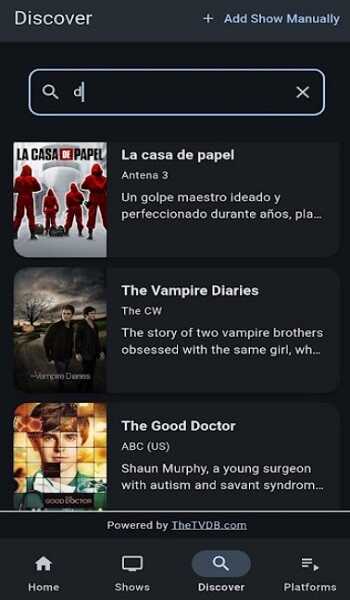
The second improvement is time. When your watchlist is organized and platform details are visible, you move faster from “What should I watch?” to “I know exactly what is next.” That sounds simple, but it changes the whole flow of your evening.
The third improvement is control. Seriesly APK gives you a better view of how you actually consume content. You can see:
-
What you are actively following
-
What keeps getting postponed
-
Which services support your current interests
-
Where your entertainment money is going
Advertisement
This makes your streaming routine feel less reactive and more deliberate.
There is also an emotional side to this. When your viewing habits are organized, entertainment feels lighter. You stop wasting energy on repeated searching, forgotten episodes, and platform confusion. Instead, you enjoy the content itself with fewer interruptions.
For heavy viewers, this structure becomes especially valuable. If you are following seasonal releases, rotating between genres, or managing a long backlog, Seriesly helps you stay grounded. It turns streaming from a messy pile of options into a cleaner personal system.
How to Use Seriesly APK on Android
One reason Seriesly APK feels accessible is that it does not ask you to learn a complicated workflow. The app is built around a few simple actions that become part of your normal viewing routine.
Start by searching for the shows you already watch. Add them to your main watchlist so your library reflects your real habits from the beginning. If you are in the middle of a season, set your current episode right away. That gives the app an accurate starting point.
Once your first titles are added, your routine becomes simple:
-
Open the show entry
-
Update your episode progress
-
Change the status if needed
-
Rate the show when you finish a season or series
It also helps to use statuses actively. Do not leave everything in one default list. Put active series in Watching, move future ideas into Plan to Watch, and send paused titles to Waiting. This keeps your interface cleaner and your choices clearer.
Next, add your subscriptions. Enter the streaming services you pay for and assign their monthly costs. This gives the app more practical value because it connects your watchlist with your budget.
To use the app effectively, remember one key habit: update it regularly. The app works best when your progress is current. A quick update after each episode takes only a moment and keeps your library reliable.
A simple routine often works best:
-
Add shows as soon as they interest you
-
Update episodes right after watching
-
Review subscription costs once a month
-
Use ratings to build a better personal history
With these habits, Seriesly APK becomes more than a tracker. It becomes a lightweight control center for your TV watching life.
Pros and Cons of Seriesly APK
Every app has strengths and limits, and Seriesly APK is no exception. The good news is that its strengths match what many Android users actually need.
Pros
-
Clean and simple interface
-
Easy episode tracking
-
Unified watchlist for multiple platforms
-
Helpful subscription cost monitoring
-
Clear status filters for better organization
-
Personal rating system for long-term viewing habits
-
Mobile-friendly design that fits daily use
The biggest advantage is focus. Seriesly does not try to overload users with unnecessary layers. It solves clear problems and does so in a way that feels direct.
Cons
-
Less centered on social interaction
-
May feel more minimal than cloud-heavy ecosystems
-
Advanced users may want deeper sync-style features
These are not major drawbacks for everyone. In fact, some users will see the app’s minimal approach as a benefit rather than a weakness. If your main goal is personal TV tracking, Seriesly APK stays aligned with that purpose.
Overall, the app succeeds because it understands its role well. It is designed for organization, not distraction.
Seriesly APK vs Other TV Tracker Apps
The TV tracker category already includes several known names, so it is fair to ask where Seriesly APK fits. The answer is simple: it fits best for users who want practical organization without too much noise.
Some tracker apps focus heavily on syncing ecosystems, social features, or rich discovery layers. Those tools can be useful, but they can also make an app feel crowded. Seriesly takes a different path. It keeps the focus on watchlist management, episode tracking, streaming availability, and subscription visibility.
Compared with more feature-dense options, Seriesly often feels:
-
Cleaner
-
More direct
-
Easier to learn
-
Better suited for personal use
Its cost tracking feature also gives it a more grounded, real-world advantage. Many viewers are not just managing shows. They are managing monthly entertainment spending. By combining both, the app feels more useful in daily life.
If your priority is a light, organized, and mobile-friendly TV tracker, Seriesly APK makes a strong case for itself. It does not need to do everything. It just needs to do the right things well.
Is Seriesly APK Safe to Use?
When users look for a tracking app, safety and clarity matter. Seriesly APK presents itself as a TV management tool rather than a streaming platform. That distinction is important because the app’s role is focused on organization, progress tracking, and subscription awareness.
It also uses structured metadata support to keep show details more accurate, which improves reliability inside the app. From a general user perspective, its purpose is practical and easy to understand. It is there to help you manage your TV routine, not complicate it.
For the best experience, users should always choose reliable download sources and keep apps updated. That is a smart general habit for any Android app, especially one you want to use regularly.
The app’s simple purpose, clean design, and organized feature set support a more comfortable experience for viewers who value clarity and control.
Final Verdict
Seriesly APK is a smart choice for Android users who want a better way to manage TV series without overcomplicating the process. It takes the everyday problems of modern streaming, such as scattered watchlists, forgotten episodes, platform confusion, and rising subscription costs, and turns them into something more manageable.
Its strongest advantage is balance. The app gives you enough tools to stay organized without making the interface heavy or difficult. You get a unified watchlist, accurate progress tracking, platform visibility, smart filters, personal ratings, and budget-friendly subscription tracking in one clean mobile-first experience.
If you are someone who watches multiple shows, likes to plan what comes next, or wants more control over how your streaming routine works, Seriesly APK is well worth considering. It brings structure to your watch habits, saves time in small but meaningful ways, and helps you enjoy your shows with less confusion.
In a world full of content and constant platform switching, that kind of clarity matters. And that is exactly why Seriesly APK stands out as one of the most practical TV show tracker apps for Android today.
FAQs Seriesly
Seriesly APK is a TV show tracker for Android that helps you manage your watchlist, track episode progress, and organize shows across different streaming platforms in one place.
No, Seriesly APK is not a streaming app. It does not provide video content. Instead, it helps you track what you are watching and where each show is available.
Seriesly APK allows you to manually update your current episode and mark watched episodes. This helps you continue your shows without losing track of your progress.
Yes, Seriesly APK includes a subscription tracking feature. You can add your streaming services and monitor your monthly costs to better manage your entertainment budget.
Seriesly APK is designed as a tracking and management tool for TV shows. As long as you download it from a reliable source and keep it updated, it provides a safe and useful experience for Android users.






Share Your Thoughts